Hunting Pokémon with Req: consuming APIs in Elixir
A cascade of eight public APIs with Req in Elixir: from your ZIP code to a Pokémon's evolution chain, passing through map, weather and sunset. All running in iex.

Saturday night, I was lying on the couch watching Pokémon on my phone. Episode 13, the one where Ash gets to the lighthouse and a giant shadow shows up in the fog. Dragonite. Two meters of flying dragon appearing for the first time, and Bill trying to talk to it. I’ve seen this episode about ten times. I still think it’s beautiful.
And then came one of those silly ideas that only show up when you should be asleep: what if I built a whole Pokémon hunt out of nothing but APIs?
I know, I know. Hold on. Every API tutorial in tech eventually turns into a Pokédex. It’s practically a law of nature. It became the “hello world” of teaching people how to pull data from somewhere, and by now it’s so worn out it’s almost embarrassing to announce. But hold the eye-roll, because we’re not building yet another static Pokédex that just lists the original 151. The bit here is different: pretend you’re that kid who just laced up new sneakers and left home to become a Pokémon trainer. Each API is a stop on the journey. You start from your ZIP code, find out where you are on the map, check if it’s going to rain, see what time the sun sets, run into a Pokémon on the way, read its Pokédex entry, study its weaknesses, and in the end trace where it came from. All in code.
I got up, opened the laptop, opened iex. What came out is this post.
We’re going to consume eight real public APIs using Req, the most complete HTTP client Elixir has today. Each API feeds the next one in a cascade: the result of one becomes the input to the next. None of them asks for a key. And it all runs in the terminal, copy and paste.
First things first: what is an HTTP client?
If you’ve never touched an API, relax. Let me explain from the start.
When you open your browser and type an address, like google.com, the browser sends a request to a server somewhere in the world. That request is called an HTTP request. The server answers with data: the page, an image, a pile of text. That answer is called, you guessed it, an HTTP response.
An HTTP client does exactly that, but from code. Instead of opening Chrome and clicking a link, you write one line of Elixir. It goes out, hits the server, grabs the response and hands you the data. It’s your invisible browser.
And JSON? It’s a text format APIs use to return organized data. It looks like a map, with keys and values: {"name": "Frank", "city": "Belém"}. Elixir knows how to read that and turn it into a real map, which you reach with data["name"].
Why Req, and not the others
Elixir has several HTTP clients. The three best known are HTTPoison, Tesla and Req.
HTTPoison was the community default for a long time. It works fine, but underneath it uses an Erlang library called hackney, which drags some dependencies along and can complicate SSL setup. And the response body comes back as a raw string, so you have to decode the JSON by hand with Jason.decode! every single time. That tripped me up early on. I’d forget the decode! and sit there confused about why body["name"] blew up.
Tesla is pretty flexible. It works with middlewares, chunks of code you stack to configure the request before it goes out. You can swap the engine underneath. If you come from Ruby, it’s a lot like Faraday. Good client, but it asks for more setup for things Req already does on its own.
Req is the newest one. It was built by Wojtek Mach, who is on the Elixir core team. It uses Finch underneath, which is fast and light. The whole point of Req is that it ships with everything turned on out of the box: it decodes JSON by itself, follows redirects, retries on error, compresses the body. Without you configuring anything.
Look at the same call in all three:
# HTTPoison
{:ok, %HTTPoison.Response{body: body}} = HTTPoison.get("https://api.github.com/repos/wojtekmach/req")
data = Jason.decode!(body)
data["description"]

# Tesla
client = Tesla.client([Tesla.Middleware.JSON])
{:ok, %Tesla.Env{body: body}} = Tesla.get(client, "https://api.github.com/repos/wojtekmach/req")
body["description"]

# Req
Req.get!("https://api.github.com/repos/wojtekmach/req").body["description"]

One line. It did the GET, decoded the JSON and handed you the map. No adapter, no middleware, no Jason.decode!. When you’re chaining eight APIs on a Saturday night, that weighs a lot.
Setting up
Everything here runs with Mix.install, no project at all. Open iex and paste:
Mix.install([{:req, "~> 0.5.0"}])
That pulls in Req and its dependencies straight into the terminal. If you’ve used Python, it’s like a pip install that works inside the REPL itself. (The REPL is the language’s interactive terminal, the one where you type code and see the result right away. In Elixir it’s called iex.)
Done. Let’s hunt.
Chapter 1: Where am I?
API: BrasilAPI (CEP v2) · docs

Every adventure starts somewhere. I live in Belém do Pará, so I’ll use a ZIP code from here (in Brazil we call it CEP). BrasilAPI is a public Brazilian API that gathers several services in one place (postal codes, company registrations, banks, holidays), free and keyless.
cep = "66017000"

resp = Req.get!("https://brasilapi.com.br/api/cep/v2/#{cep}")
address = resp.body

IO.puts("""
Address found:
  Street:  #{address["street"]}
  Area:    #{address["neighborhood"]}
  City:    #{address["city"]}
  State:   #{address["state"]}
""")
Address found:
  Street:  Avenida Presidente Vargas
  Area:    Campina
  City:    Belém
  State:   PA
Look at resp.body: it’s already an Elixir map. Req saw the response came with Content-Type: application/json, decoded it on its own, and I went straight to reading the keys. No Jason.decode! in sight.
A heads-up, because this caught me while writing this post: if one day the CEP hands you a status: 404 with a message like “Todos os serviços de CEP retornaram erro” (all CEP services returned an error), it’s not your code. BrasilAPI looks the CEP up in external providers (the postal service, ViaCEP and others), and sometimes they all go down at once for a specific CEP. Swap in another CEP and move on.
Avenida Presidente Vargas is one of the busiest in Belém. It runs past the Ver-o-Peso market, past everything. Good place to start.
Chapter 2: Where exactly?
API: Nominatim (OpenStreetMap) · docs

To check weather and sunset I need coordinates, latitude and longitude. BrasilAPI v2 sometimes returns them, sometimes not, depending on which provider answered. To be safe, we use Nominatim, the geocoding service from OpenStreetMap. Geocoding is the fancy word for “turn an address into coordinates on the map”.
query = "#{address["street"]}, #{address["city"]}, #{address["state"]}, Brazil"

geo = Req.get!("https://nominatim.openstreetmap.org/search",
  params: [q: query, format: "json", limit: 1],
  headers: [{"user-agent", "pokemon-hunt-tutorial/1.0"}]
).body |> List.first()

lat = geo["lat"]
lon = geo["lon"]

IO.puts("""
Coordinates:
  Latitude:  #{lat}
  Longitude: #{lon}
""")
Coordinates:
  Latitude:  -1.4557549
  Longitude: -48.4901878
Two things to keep. Req’s params builds the query string for you. I passed a keyword list, [q: query, format: "json", limit: 1], and it turned that into ?q=Avenida+Presidente+Vargas...&format=json&limit=1. No string concatenation, no URI.encode.
The other: Nominatim asks you to send a User-Agent header identifying your app. Without it, it can refuse you. Req takes headers as a list of tuples, and that’s what the {"user-agent", ...} is doing.
Coordinates in hand, we can see the spot on the map:
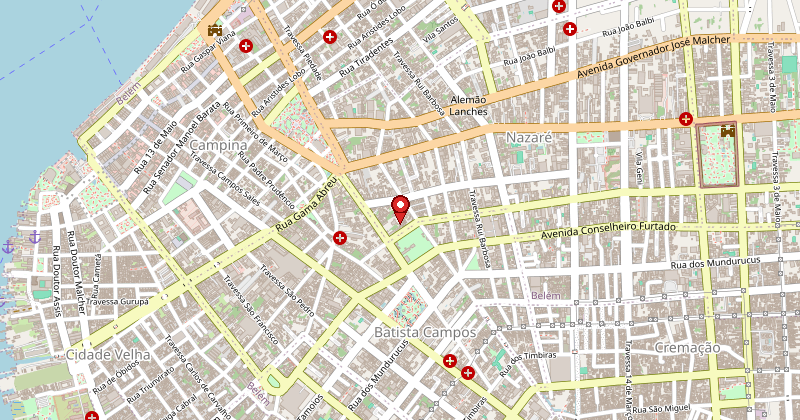
Map © OpenStreetMap contributors.
That’s downtown Belém: Campina, Nazaré, the old town (Cidade Velha) down below, and Guajará bay on the left. The pin is on the point Nominatim gave me.
Chapter 3: Will it rain?
API: Open-Meteo · docs

Anyone who lives in Belém knows: it rains almost every day. The sky is clear and ten minutes later a storm rolls in. Before going out hunting anything, better check.
Open-Meteo is a weather forecast API, free and keyless. You send latitude and longitude, it returns the current weather, the forecast for the next hours, whatever you ask for.
weather = Req.get!("https://api.open-meteo.com/v1/forecast",
  params: [
    latitude: lat,
    longitude: lon,
    current: "temperature_2m,relative_humidity_2m,rain,wind_speed_10m,weather_code",
    timezone: "America/Belem"
  ]
).body["current"]

description = case weather["weather_code"] do
  0 -> "Clear sky"
  1 -> "Mostly clear"
  2 -> "Partly cloudy"
  3 -> "Cloudy"
  code when code in [61, 63, 65] -> "Raining"
  code when code in [80, 81, 82] -> "Rain showers"
  code when code in [95, 96, 99] -> "Thunderstorm"
  _ -> "Code #{weather["weather_code"]}"
end

IO.puts("""
Weather now in Belem:
  Sky:         #{description}
  Temperature: #{weather["temperature_2m"]}C
  Humidity:    #{weather["relative_humidity_2m"]}%
  Wind:        #{weather["wind_speed_10m"]} km/h
  Rain:        #{weather["rain"]} mm
""")
Weather now in Belem:
  Sky:         Partly cloudy
  Temperature: 28.3C
  Humidity:    78%
  Wind:        12.5 km/h
  Rain:        0.0 mm
The weather_code follows a standard from the World Meteorological Organization (WMO). It’s just a number: 0 is clear sky, 61 is light rain, 95 is a thunderstorm. I wrote a simple case to translate the ones that matter. In a real project you’d make a separate function with all the roughly one hundred codes, but for a night in iex this does the job.
Zero rain, 28 degrees. Belém cooperating, which is rare.
Chapter 4: What time does the sun set?
API: Sunrise-Sunset · docs

Hunting in the dark doesn’t work. Unless you want Ghost-type Pokémon, but that’s another conversation. Let’s see how much daylight is left.
sun = Req.get!("https://api.sunrise-sunset.org/json",
  params: [lat: lat, lng: lon, date: "today", formatted: 0]
).body["results"]

sunrise = sun["sunrise"] |> String.split("T") |> List.last() |> String.split("+") |> List.first()
sunset = sun["sunset"] |> String.split("T") |> List.last() |> String.split("+") |> List.first()

IO.puts("""
Sun times (UTC):
  Sunrise: #{sunrise}
  Sunset:  #{sunset}
  Day length: #{sun["day_length"]}s (#{div(sun["day_length"], 3600)}h#{rem(div(sun["day_length"], 60), 60)}min)
""")
Sun times (UTC):
  Sunrise: 09:09:42
  Sunset:  21:21:18
  Day length: 43896s (12h11min)
The times come in UTC because I passed formatted: 0, which asks for the ISO 8601 format. Belém is at UTC-3, so in practice the sun sets around 18:21 local time. Plenty of time.
Notice the hack: I chained a few String.split calls to rip just the time out of the timestamp. Not the prettiest thing in the world, I know. In a real project I’d use Elixir’s DateTime to do it properly. But it was Saturday night and laziness won.
Chapter 5: The encounter
API: PokéAPI (pokemon) · docs

Sun shining, sky open, coordinates in hand. Time to run into a Pokémon.
PokéAPI is a free API with data on every Pokémon that has ever existed, more than a thousand. No auth, no aggressive limits. It’s one of the best public APIs out there for learning.
I’ll draw a random one from the first generation, 1 to 151, because the classics are the best. I will die on this hill.
pokemon_id = Enum.random(1..151)

pokemon = Req.get!("https://pokeapi.co/api/v2/pokemon/#{pokemon_id}").body

types = Enum.map(pokemon["types"], fn t -> t["type"]["name"] end)
abilities = Enum.map(pokemon["abilities"], fn a -> a["ability"]["name"] end)

sprite_url = pokemon["sprites"]["other"]["official-artwork"]["front_default"]

IO.puts("""
Pokemon found!

  ##{pokemon["id"]} #{String.upcase(pokemon["name"])}
  Types:     #{Enum.join(types, " / ")}
  Height:    #{pokemon["height"] / 10} m
  Weight:    #{pokemon["weight"] / 10} kg
  Abilities: #{Enum.join(abilities, ", ")}

  Artwork: #{sprite_url}
""")
Pokemon found!

  #149 DRAGONITE
  Types:     dragon / flying
  Height:    2.2 m
  Weight:    210.0 kg
  Abilities: inner-focus, multiscale

  Artwork: https://raw.githubusercontent.com/PokeAPI/sprites/master/sprites/pokemon/other/official-artwork/149.png
Would you look at that, it landed on him. Here he is:

Two meters twenty, 210 kilos, with the face of someone who’d give you a hug. But it’s a flying dragon. Show respect.
PokéAPI’s sprites field is huge. It has a front sprite, a back one, shiny, the old-game versions, and the official artwork, which is the prettiest. All as public URLs, so you can use them straight in an <img> on your site. Height comes in decimeters and weight in hectograms, because PokéAPI follows the units from the original games. I divided by 10 to get meters and kilos.
Chapter 6: What does the Pokédex say?
API: PokéAPI (pokemon-species) · docs
Found the creature. But what does the Pokédex say about it? PokéAPI has a separate endpoint for species data, including the description in several languages.
species = Req.get!("https://pokeapi.co/api/v2/pokemon-species/#{pokemon["id"]}").body

entry = Enum.find(species["flavor_text_entries"], fn e ->
  e["language"]["name"] == "en" and e["version"]["name"] == "red"
end)

text = entry["flavor_text"] |> String.replace("\n", " ") |> String.replace("\f", " ")

genus = species["genera"] |> Enum.find(& &1["language"]["name"] == "en") |> Map.get("genus")

IO.puts("""
Pokedex (##{pokemon["id"]} - #{genus}):

  "#{text}"

  Capture rate:   #{species["capture_rate"]}/255
  Base happiness: #{species["base_happiness"]}
  Color:          #{species["color"]["name"]}
  Habitat:        #{species["habitat"]["name"]}
""")
Pokedex (#149 - Dragon Pokémon):

  "An extremely rarely seen marine POKéMON. Its intelligence is said to match that of humans."

  Capture rate:   45/255
  Base happiness: 35
  Color:          brown
  Habitat:        rare
Capture rate 45 out of 255. Low. In practice that means, without an Ultra Ball and a Pokémon that puts the target to sleep, it’s going to hurt. Habitat “rare”, of course.
Notice the cascade happening: I used the pokemon["id"] that came from the previous call as the input to this one. One API feeds the next.
One annoying bit: flavor_text comes with \n and \f (form feed) in the middle, because it’s pulled straight from the old game data. That’s why the two String.replace. Ugly, but it works.
Chapter 7: Know your enemy
API: PokéAPI (type) · docs
If I were a real trainer, I’d need to know: what hits it hard, and what is it strong against? The damage relations live in a separate endpoint. The Pokémon response gave me the types (dragon, flying), so now I take each type and look it up.
IO.puts("Combat analysis:\n")

Enum.each(types, fn type ->
  relations = Req.get!("https://pokeapi.co/api/v2/type/#{type}").body["damage_relations"]

  weak    = Enum.map(relations["double_damage_from"], & &1["name"])
  strong  = Enum.map(relations["double_damage_to"], & &1["name"])
  resists = Enum.map(relations["half_damage_from"], & &1["name"])
  immune  = Enum.map(relations["no_damage_from"], & &1["name"])

  IO.puts("""
    #{String.upcase(type)}
    Weak against:   #{Enum.join(weak, ", ")}
    Strong against: #{Enum.join(strong, ", ")}
    Resists:        #{Enum.join(resists, ", ")}
    Immune to:      #{if immune == [], do: "nothing", else: Enum.join(immune, ", ")}
  """)
end)
Combat analysis:

  DRAGON
  Weak against:   ice, dragon, fairy
  Strong against: dragon
  Resists:        fire, water, grass, electric
  Immune to:      nothing

  FLYING
  Weak against:   rock, electric, ice
  Strong against: fighting, bug, grass
  Resists:        fighting, bug, grass
  Immune to:      ground
Ice shows up in both weakness lists. Double damage from ice through the Dragon type, double damage from ice through the Flying type. In practice that turns into quadruple damage on Dragonite. Bring a Lapras or an Articuno and it’s over.
But look at the other side: immune to ground because of the Flying type, and resists fire, water, grass and electric because of Dragon. This thing isn’t fragile. It just has that frozen Achilles’ heel.
Chapter 8: Where did it come from?
API: PokéAPI (evolution-chain) · docs
Last stop. Dragonite isn’t born a Dragonite. It starts small and evolves. PokéAPI keeps the evolution chain in a separate endpoint, and the species endpoint (which we already called) carries the URL for that chain.
chain_url = species["evolution_chain"]["url"]
chain = Req.get!(chain_url).body["chain"]

names = [chain["species"]["name"]]

names =
  if chain["evolves_to"] != [] do
    second = hd(chain["evolves_to"])
    names = names ++ [second["species"]["name"]]

    if second["evolves_to"] != [] do
      names ++ [hd(second["evolves_to"])["species"]["name"]]
    else
      names
    end
  else
    names
  end

IO.puts("Evolution chain:\n")

Enum.each(Enum.with_index(names, 1), fn {name, idx} ->
  evo = Req.get!("https://pokeapi.co/api/v2/pokemon/#{name}").body
  IO.puts("  #{idx}. #{String.upcase(name)} (##{evo["id"]})")
end)
Evolution chain:

  1. DRATINI (#147)
  2. DRAGONAIR (#148)
  3. DRAGONITE (#149)

Dratini, a little snake, 1.8 m, with a harmless face. It becomes Dragonair, a kind of magical blue serpent. And then it becomes Dragonite, a chubby, friendly 2.2 m dragon. Nature is strange.
And look what happened here: I called PokéAPI again inside a loop, once per evolution stage, to get each one’s number. Every call is fast because Req uses connection pooling underneath (via Finch): it reuses the same network connection instead of opening a new one every time.
The whole cascade
Eight calls, each feeding the next. Put it all in one script to copy and paste:
Mix.install([{:req, "~> 0.5.0"}])

# 1. CEP -> Address (BrasilAPI)
cep = "66017000"
address = Req.get!("https://brasilapi.com.br/api/cep/v2/#{cep}").body
IO.puts("#{address["street"]}, #{address["neighborhood"]} - #{address["city"]}/#{address["state"]}")

# 2. Address -> Coordinates (Nominatim)
query = "#{address["street"]}, #{address["city"]}, #{address["state"]}, Brazil"
geo = Req.get!("https://nominatim.openstreetmap.org/search",
  params: [q: query, format: "json", limit: 1],
  headers: [{"user-agent", "pokemon-hunt/1.0"}]
).body |> List.first()
{lat, lon} = {geo["lat"], geo["lon"]}
IO.puts("Lat: #{lat}, Lon: #{lon}")

# 3. Coordinates -> Weather (Open-Meteo)
weather = Req.get!("https://api.open-meteo.com/v1/forecast",
  params: [latitude: lat, longitude: lon, current: "temperature_2m,rain,weather_code", timezone: "America/Belem"]
).body["current"]
IO.puts("#{weather["temperature_2m"]}C | Rain: #{weather["rain"]}mm | Code: #{weather["weather_code"]}")

# 4. Coordinates -> Sunrise/Sunset (Sunrise-Sunset)
sun = Req.get!("https://api.sunrise-sunset.org/json",
  params: [lat: lat, lng: lon, date: "today", formatted: 0]
).body["results"]
IO.puts("Day with #{div(sun["day_length"], 3600)}h#{rem(div(sun["day_length"], 60), 60)}min of light")

# 5. Random Pokemon (PokeAPI)
pokemon_id = Enum.random(1..151)
pokemon = Req.get!("https://pokeapi.co/api/v2/pokemon/#{pokemon_id}").body
types = Enum.map(pokemon["types"], & &1["type"]["name"])
IO.puts("#{String.upcase(pokemon["name"])} (##{pokemon["id"]}) - #{Enum.join(types, "/")}")

# 6. Pokedex (PokeAPI species)
species = Req.get!("https://pokeapi.co/api/v2/pokemon-species/#{pokemon["id"]}").body
entry = Enum.find(species["flavor_text_entries"], & &1["language"]["name"] == "en")
if entry, do: IO.puts(String.replace(entry["flavor_text"], ~r/[\n\f]/, " "))

# 7. Weaknesses (PokeAPI type)
type = List.first(types)
weak = Req.get!("https://pokeapi.co/api/v2/type/#{type}").body["damage_relations"]["double_damage_from"]
IO.puts("Weak against: #{Enum.map(weak, & &1["name"]) |> Enum.join(", ")}")

# 8. Evolution (PokeAPI evolution-chain)
chain = Req.get!(species["evolution_chain"]["url"]).body["chain"]
names = [chain["species"]["name"]]
names = if chain["evolves_to"] != [], do: names ++ [hd(chain["evolves_to"])["species"]["name"]], else: names
names =
  if chain["evolves_to"] != [] and hd(chain["evolves_to"])["evolves_to"] != [],
    do: names ++ [hd(hd(chain["evolves_to"])["evolves_to"])["species"]["name"]],
    else: names
IO.puts("Evolution: #{Enum.join(names, " -> ")}")
Run it and something like this comes out:
Avenida Presidente Vargas, Campina - Belém/PA
Lat: -1.4557549, Lon: -48.4901878
28.3C | Rain: 0.0mm | Code: 2
Day with 12h11min of light
DRAGONITE (#149) - dragon/flying
An extremely rarely seen marine POKéMON. Its intelligence is said to match that of humans.
Weak against: ice, dragon, fairy
Evolution: dratini -> dragonair -> dragonite
Eight APIs, one cascade, zero configuration.
Req.new: for when you’ll keep coming back
If you liked PokéAPI and you’re going to keep hitting it, Req has Req.new so you don’t repeat the whole URL every time.
pokeapi = Req.new(base_url: "https://pokeapi.co/api/v2")

pikachu = Req.get!(pokeapi, url: "/pokemon/pikachu").body
IO.puts("#{pikachu["name"]} - #{pikachu["weight"] / 10} kg")

bulbasaur = Req.get!(pokeapi, url: "/pokemon/bulbasaur").body
IO.puts("#{bulbasaur["name"]} - #{bulbasaur["weight"] / 10} kg")
pikachu - 6.0 kg
bulbasaur - 6.9 kg
base_url sets the root, and each Req.get! takes only the path after it. If you’ve used Axios in JavaScript, it’s the same idea of an instance with a base URL.
What else Req does
We only used Req.get! here, but there’s a lot more. Things I use day to day:
Send a POST with JSON: Req.post!("https://httpbin.org/post", json: %{name: "Frank"}). It serializes the map and sets the Content-Type for you.
If the request fails on a timeout or a 5xx error, Req retries on its own. You can tune it with retry: :transient, but the default already covers most cases.
Streaming saved me once. Req.get!(url, into: File.stream!("file.zip")) downloads the file in chunks, without eating all your memory. I used it to pull some huge CSVs from the central bank and it worked without drama.
There’s also Bearer auth (auth: {:bearer, "my-token"}), ETag caching (cache: true), and community plugins like req_s3 for talking to S3 and curl_req for turning a cURL command into Req.
If you come from Python, Req is the closest relative to requests. Same philosophy: work nicely with the least code possible.
Wrapping up
We started at ZIP code 66017-000 in Belém and ended on Dragonite’s evolution chain. Eight public APIs, no keys, a map of my city, some Pokémon as a reward, and about forty lines of Elixir.
Swap the ZIP for yours. Throw in Enum.random(1..1025) to catch newer Pokémon. Check the weather in your town. If you get an ice-type Pokémon on a rainy day in Belém, that’s a nice match.
Open iex, paste the Mix.install, and go break things.